










Playbook
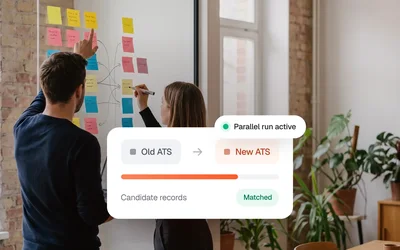
ATS Migration Without Data Loss
Employers keep posting in the ATS they already have. Kini brings their jobs to your board and files each application in the employer's system, with a sync status for every record.
The more employers post on your board, the more systems you have to keep connected.
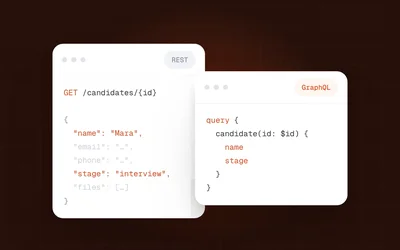
One ATS has a modern API, the next only exports XML. Every connection needs engineers your team can't spare, and each later change costs their time again.
Custom fields, free-text locations and broken markup come from every source. Without an event, a closed job stays on your board until the next check.
A token expires or a field changes its name, and applications stop reaching the ATS. Billing per click or per application only holds when you can show that each one arrived.
Each employer has to find credentials, sometimes ask their ATS vendor for access and walk your team through the setup. Until then, their jobs stay off your board.

You build one integration with the Kini API, a feed or webhooks. Kini reaches each employer's ATS however it can be reached, delivers their jobs to your board and sends applications back into the ATS the job came from.
Kini is the managed connectivity layer between job boards and the ATS of their employers. The job board keeps one connection to Kini. Behind it, Kini connects 75+ ATS, delivers new, changed and archived jobs as events, sends each application into the employer's ATS and reports a sync status per record.
Your team builds one connection and works on the board. The part between the ATS and your board runs on Kini.
You keep one connection and one API key. New ATS join behind it without a new project.
Each employer gets a Magic Link with a setup guide and enters their own ATS credentials. You never see them.
Each application you send reports SUCCESS, FAILURE or another sync status. You can show employers what arrived.
Kini keeps the connector for each ATS up to date and monitors every source.
No engineering backlog. No manual data handling. Just a working connection between your tools.





















Every capability has its own chapter, for the people on your team who check the details.
Each job comes with its application form fields and screening questions.
Your endpoint receives an event whenever a job is created, changed or archived, so your board stays current without polling.
Screening questions are set per job and can change after it goes live. Build each form from the latest update so every answer matches a current question.
Each update carries the complete ad, from title to description. Edits made on the board are overwritten by the next update.
By default Kini pulls jobs once an hour, and the interval can be shortened per employer.
Career pages are crawled on the same hourly schedule.
From your side, jobs from a career page work like jobs from an ATS API.
If an ATS delivers empty or wrong job data, Kini holds it back. Descriptions arrive as clean HTML, and fields are already mapped.
Locations and source values are normalised before they reach you.
Missing fields get an explicit fallback.
If a source delivers empty data, the jobs on your board stay as they are.
Kini delivers each application with its answers and attachments into the ATS the job came from. You get a sync status back for every record.
Each application reports SUCCESS, SUCCESS_FALLBACK, FAILURE, EXPECTED_FAILURE or NOTSENT, with a failure_error for diagnosis.
Applications go to the ATS as they come in.
Send your own partner_application_id with each submission to avoid duplicates.
Kini passes a source with each application, for example the name of your board. After 180 days personal data is anonymised.
The source travels with each application into the employer's ATS.
Job, channel, status and timestamps stay available after anonymisation.
Sync the candidate data you need into your own system within the 180 days.
The Magic Link includes a setup guide for the employer's ATS. Once we have the credentials, the connection is live in minutes.
Some ATS need a step from the vendor first, and Kini prepares that request.
Credentials go directly to Kini and never touch your systems.
If someone gets stuck, we join the call.
What reaches your team follows three rules.
A job that ends comes through the Job Update webhook like any other change.
Each delivery attempt sends its own event. Keep the newest one per application.
Subscribe to the events your board needs, from Job Updates to Application Sync Status.
The full list has a page per ATS that shows what flows in each direction. If an employer runs a system that is not on the list yet, Kini adds a new path.


On the source side Kini works with API, feeds, email, crawler or custom paths.
For an ATS without a usable API, Kini can read the career page.
Personio, for example, exchanges jobs by XML feed.
From enterprise HR platforms to lean recruiting boutiques. Teams use Kini to connect their tools without involving engineering. Here's what they say.

"Kini publishes our customers' jobs automatically and links them to their ATS. Lots of manual work is gone."

"Kini brings our customers' jobs into CareerOS automatically. We choose which ones are relevant."


"Kini moves candidates from Juucy straight into our customers' ATS. Our tech team stays on the core product."

"With Kini, our customers post jobs to the Bundesagentur für Arbeit automatically. Most manual upkeep is gone."


Kini watches each employer's connection, retries failed deliveries and brings in a person when that does not solve it.
When an ATS vendor breaks their API, Kini updates the connector.
Failed syncs are retried automatically and keep an explicit status.
If retries don't fix it, someone on the Kini team works it out with the source.
Employers see every state by email and in the dashboard. Note: the email comes from Kini, not from your brand.

180days
Applicant data in Kini is deleted or anonymised after 180 days, so you don't manage that retention yourself.
Each employer's ATS credentials are stored in Kini Core, encrypted in transit and at rest.
Kini sends the template early, so legal review runs alongside your technical pilot.
The questions job boards ask before they connect to Kini.

Less than most teams expect. Your end-customer connects their own ATS through the magic link, so no engineering work happens there. On your side one technical contact for the API key and webhook endpoint is enough. Kini has setup guides for many ATS and joins onboarding calls on request.
By default, jobs move outward from the ATS to your channels, and applications move back into the customer's ATS. For some ATS, Kini can also read applications from the ATS and pass them on to other systems.
Make changes in the ATS. It is the source system, and every update sends the complete ad again, so edits made directly on the board are overwritten. If the ATS refreshes a job automatically and gives it a new ID, the job can drop out of a running campaign that is linked to that ID.
The API is not idempotent: every POST creates a record. So send your own partner_application_id with each submission and check before retrying. When the customer's ATS rejects an already-known candidate, Kini marks the application EXPECTED_FAILURE with failure_error DuplicateApplicationError rather than treating it as a real error.
Every application carries a visible status. In the app you see per-record pills such as Notsent and Failure, sync icons per customer and a dashboard with sync KPIs. Programmatically the same information arrives through the Application Sync Status webhook or by polling GET /applications.
Both, depending on direction. By default, Kini pulls jobs from a connected ATS once an hour, and career-page crawling works the same way. The interval is set per company and can be shortened on request. Applications are sent to the ATS as they come in, and events (job created, updated or archived, application sync status, booking status) are pushed to your endpoint by webhook.
For an ATS Kini already supports, the connection itself is set up in minutes once we have the credentials. What usually takes longer is getting them: some ATS vendors need a step on their side first, such as issuing an API key or a certificate, or allowlisting Kini. Kini then checks the setup with a test application and activates the integration. If your first customer runs a system Kini has not connected yet, the timeline depends on building that connector, and we say so in the first call rather than afterwards.
No. With magic-link onboarding your end-customer enters their own ATS credentials through a link you generate, so you never see them. For some systems the customer's ATS admin or vendor has to create the credentials first, for example an API key or a certificate. If you already hold credentials, you can enter them yourself, alone or together with the customer during a call.
The product hub, the resource library, every integration we connect to, the full FAQ and the docs maintained by the team. Five places that might hold the answers you are searching for.
Sync engine, mapping logic, error handling. Each page shows the data flow with concrete examples.
What teams ask before, during and after connecting to Kini: setup, integrations, mapping, pricing and support.
Playbooks, technical guides, news and events from the Kini team, updated and kept honest.
Each integration page lists setup time, the fields synced, known limits and the team's recommended config.

Topics: getting started, integrations, data sync, migration, pricing. Migration questions get asked the most.

Setup walkthroughs, API reference, webhook payloads and integration guides. Updated with every product release.